LinkedIn is one of the most important professional networking platforms, and your profile photo is often the first impression you make. A proper LinkedIn photo size guide ensures your image looks crisp, professional, and optimized across all LinkedIn devices and surfaces. Whether you’re updating your profile picture, creating a LinkedIn banner, or sharing content through carousel posts, getting the dimensions and format right is crucial. In this comprehensive 2026 guide, we’ll walk you through everything you need to know about LinkedIn photo dimensions and how to resize your images for maximum impact.
LinkedIn Profile Photo Size — The Complete Breakdown
Your LinkedIn profile photo is one of the most important images on your professional profile. It appears in multiple places across the platform — in search results, on your profile header, in your network’s activity feeds, and in messaging conversations. Getting the size right ensures your photo looks crisp and professional everywhere it appears.
Recommended LinkedIn Profile Photo Dimensions
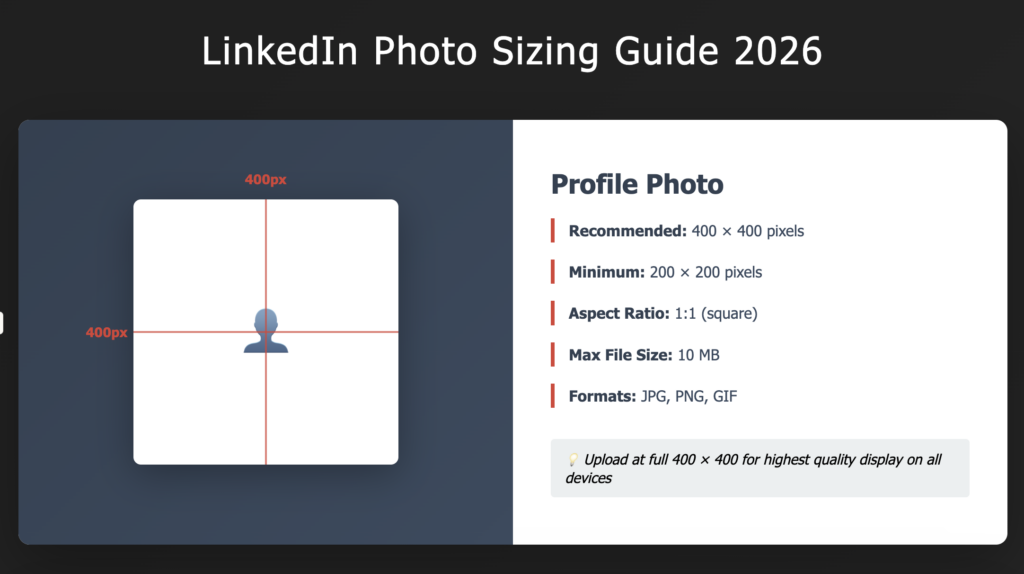
Recommended size: 400 x 400 pixels
Aspect ratio: 1:1 (square)
File size: 10 MB maximum
Supported formats: JPG, PNG, GIF
LinkedIn recommends uploading your profile photo at 400 x 400 pixels for the best quality. This dimension ensures your headshot remains crisp and clear across all devices — mobile phones, tablets, and desktop browsers. The 1:1 aspect ratio (perfectly square) is essential. Any other aspect ratio will be cropped to fit, potentially cutting off part of your face or head.
How LinkedIn Displays Your Profile Photo
Your profile photo appears at different sizes depending on where it’s viewed. On your profile itself, it displays at approximately 200 x 200 pixels. In search results and activity feeds, it might appear at 100 x 100 pixels or smaller. When someone views your profile on mobile, it may display at different dimensions. By uploading at 400 x 400 pixels, you ensure that LinkedIn has a high-resolution source to scale down from, maintaining quality at every size.
LinkedIn Banner Image Size and Dimensions
LinkedIn Banner Photo Specifications
Recommended size: 1500 x 500 pixels
Aspect ratio: 3:1
File size: 10 MB maximum
Your LinkedIn banner image (also called a background image) spans the width of your profile and creates a visual impression above your profile photo. A 1500 x 500 pixel banner ensures your image displays crisply on desktop and mobile devices. The 3:1 aspect ratio is specific to LinkedIn banners — any other ratio will be cropped.
LinkedIn Carousel and Article Image Sizes
LinkedIn Carousel Post Dimensions
If you’re creating carousel posts (multiple images that users can swipe through) on LinkedIn, use 1200 x 627 pixels for each image. This 1.91:1 aspect ratio optimizes for LinkedIn’s feed display on desktop and mobile.
LinkedIn Article Cover Image Size
When you publish a LinkedIn article, the cover image should be 1200 x 627 pixels — the same as carousel posts. This size ensures your article stands out in the LinkedIn feed with a professional, optimized appearance.
How to Resize Your LinkedIn Photos Correctly
Using Online Image Resizers
Tools like Canva, Adobe Express, or Pixlr allow you to upload your photo and specify exact dimensions. Simply:
- Upload your image
- Select “Custom Size” or your desired dimensions
- Set the aspect ratio to 1:1 for profile photos or 3:1 for banners
- Adjust framing if needed
- Download the resized image
Using Adobe Photoshop
If you use Photoshop, go to Image > Canvas Size and input 400 x 400 pixels for profile photos. This gives you precise control over cropping and framing. Learn more about how to prepare your professional headshots in our guide on preparing professional headshots for Denver.
Using Desktop Screenshot or Phone Camera
Some LinkedIn users take screenshots or use phone camera apps to capture the exact dimensions they need. This approach is quick but may result in lower resolution than uploading a properly-sized original file.
LinkedIn Photo Best Practices Beyond Size
Use a Professional Headshot for Maximum Impact
Size is just one factor — the quality of your LinkedIn profile photo matters more. A professional headshot conveys competence and builds trust. Avoid casual selfies, group photos, or images where you’re partially obscured. Your face should be clearly visible, well-lit, and the primary focus.
Keep Your Photo Recent
LinkedIn users trust current, up-to-date profile photos. If your photo is more than 2-3 years old, consider updating it. People should recognize you when they meet you in person. A recent professional headshot creates consistency between your online presence and your real-world appearance.
Optimize File Format and Quality
Use JPG for compressed file sizes while maintaining quality, or PNG if you need transparency. Avoid overly compressed images that look pixelated or blurry at full size. LinkedIn will compress your image further, so start with the highest quality you can while staying under the 10 MB file size limit.
For more guidance on professional image optimization, explore our comprehensive guide on Denver branding and product photography.
Frequently Asked Questions About LinkedIn Photo Sizes
What is the ideal LinkedIn profile photo size in 2026?
The ideal LinkedIn profile photo size is 400 x 400 pixels with a 1:1 aspect ratio (square). This ensures your headshot displays crisply across all devices and LinkedIn surfaces — from your main profile to search results to messaging conversations.
Can I use a casual photo for my LinkedIn profile?
While LinkedIn doesn’t prohibit casual photos, we recommend using a professional headshot instead. Professional photos convey competence, build trust, and generate more profile views and connections. If you’re serious about your professional presence, a quality headshot is worth the investment.
How often should I update my LinkedIn photo?
Update your LinkedIn profile photo every 2-3 years, or whenever your appearance changes significantly. People should recognize you when they meet you in person. Outdated photos create awkward moments and reduce trust in your professional presence.
Should I smile in my LinkedIn photo?
A natural, confident smile is ideal for LinkedIn profile photos. It appears friendly and approachable while maintaining professionalism. Avoid overly broad grins or unnatural expressions. A genuine, relaxed smile that reaches your eyes works best.
What’s the best way to resize my LinkedIn banner image?
Use online tools like Canva or Adobe Express to resize your banner to 1500 x 500 pixels (3:1 aspect ratio). Upload your image, select the custom dimensions, and adjust framing as needed. Make sure your banner complements your profile photo and overall professional brand.
Ready to optimize your LinkedIn presence with a professional headshot that photographs perfectly at every size? Get in touch with From the Hip Photo to book your session and create the professional image that opens doors.
Photographing LinkedIn Profiles at Conferences?
If you’re planning a conference, annual meeting, or corporate event in Denver, From the Hip Photo offers on-site headshot stations with same-day delivery — so your attendees leave with polished, LinkedIn-ready photos. Our conference team has covered 1,500+ events for Fortune 500 clients.


1 Comment